Sorting Lists
Gotta' Sort'em All!
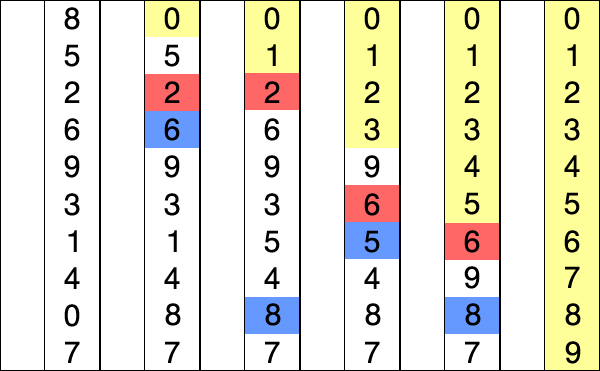
What is Sorting?
Sorting: Any process of arranging items systematically.
- Ascending
- Alphabetical: A-Z
- Numerical: 0-9
- Descending
- Reverse Alphabetical: Z-A
- Reverse Numerical: 9-0
Sorting a List Temporarily
We can sort a list temporarily by using the
sorted() function. The
sorted function lets you temporarily sort the list but
it doesn't affect the original list.
            cars = ['bmw', 'audi', 'toyota', 'subaru']
            # Temporarily sort the cars in alphabetical order
            print(sorted(cars))
            # The original list is left untouched.
            print(cars)
            > ['audi', 'bmw', 'subaru', 'toyota']
            > ['bmw', 'audi', 'toyota', 'subaru']
Sorting a List Temporarily in Reverse Order
We can provide the argument
reverse = True to the
sorted() function to
print the sorted list in reverse order Temporarily.
            cars = ['bmw', 'audi', 'toyota', 'subaru']
            # Temporarily sort the cars in alphabetical order
            print(sorted(cars, reverse=True))
            # The original list is left untouched.
            print(cars)
            > ['toyota', 'subaru', 'bmw', 'audi']
            > ['bmw', 'audi', 'toyota', 'subaru']
Reversing the Order of the List
We can permanently reverse the order of a list.
            cars = ['bmw', 'audi', 'toyota', 'subaru']
            cars.reverse()
            # The original list is permanently reversed
            print(cars)
> ['subaru', 'toyota', 'audi', 'bmw']
Permanent Sorts
Python allows us to quickly sort a list in alphabetical order with
the sort() method
              cars = ['bmw', 'audi', 'toyota', 'subaru']
              # Sort the cars permanently in alphabetical order
              cars.sort()
              print(cars)
> ['audi', 'bmw', 'subaru', 'toyota']
Reverse Sorting a List Permanently
You can sort a list in reverse order by passing the argument of
reverse=True into
the sort method.
            cars = ['bmw', 'audi', 'toyota', 'subaru']
            # Sort the cars in reverse alphabetical order
            cars.sort(reverse=True)
            print(cars)
> ['toyota', 'subaru', 'bmw', 'audi']
Finding the Length of a List
We can find how long a list is by calling the
len() function on a
list.
            cars = ['bmw', 'audi', 'toyota', 'subaru']
            # Print the length of the list.
            print(len(cars))
> 4